Okay, I am going to be the lone individual who says there are just too many emails. And yes I am all for advancement, but I don't know when this group turned into facebook (by the way I just ate my breakfast, and I will be posting pictures of where I am every 1/2 hour from now). But here is how to control the onslaught of emails, so that they all go into one folder (if you have OUTLOOK).
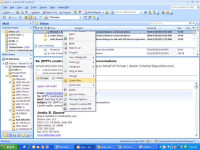
(1)Right Click on the Email from RPPTL.
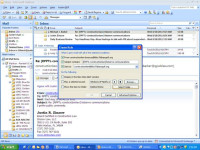
(2) Click Create Rule
(3)Check first 3 boxes.
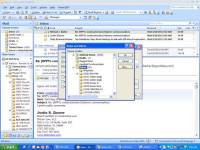
(4) Click "Select Folder"
(5) Left Click on "Inbox" (just to highlight it)
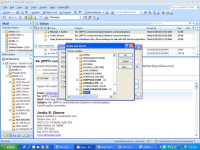
(6) Click "New"
(7) Then name the folder "RPPTL" (or whatever you want)
(8) Click "OKAY" three (3x) times
[cid:image001.jpg@01CC5745.6ABB1FF0]
[cid:image002.jpg@01CC5745.6ABB1FF0]
[cid:image003.jpg@01CC5745.6ABB1FF0]
[cid:image004.jpg@01CC5745.6ABB1FF0]
Sincerely yours,
Randall Gilbert, Esq.
Board Certified Construction Lawyer
[cid:image005.jpg@01CC5745.6ABB1FF0][cid:image006.gif@01CC5745.6ABB1FF0]
Okay, I am going to be the lone individual who says there are just too many emails. And yes I am all for advancement, but I don't know when this group turned into facebook (by the way I just ate my breakfast, and I will be posting pictures of where I am every 1/2 hour from now). But here is how to control the onslaught of emails, so that they all go into one folder (if you have OUTLOOK).
(1)Right Click on the Email from RPPTL.
(2) Click Create Rule
(3)Check first 3 boxes.
(4) Click "Select Folder"
(5) Left Click on "Inbox" (just to highlight it)
(6) Click "New"
(7) Then name the folder "RPPTL" (or whatever you want)
(8) Click "OKAY" three (3x) times
[cid:image001.jpg@01CC5745.6ABB1FF0]
[cid:image002.jpg@01CC5745.6ABB1FF0]
[cid:image003.jpg@01CC5745.6ABB1FF0]
[cid:image004.jpg@01CC5745.6ABB1FF0]
Sincerely yours,
Randall Gilbert, Esq.
Board Certified Construction Lawyer
[cid:image005.jpg@01CC5745.6ABB1FF0][cid:image006.gif@01CC5745.6ABB1FF0]